
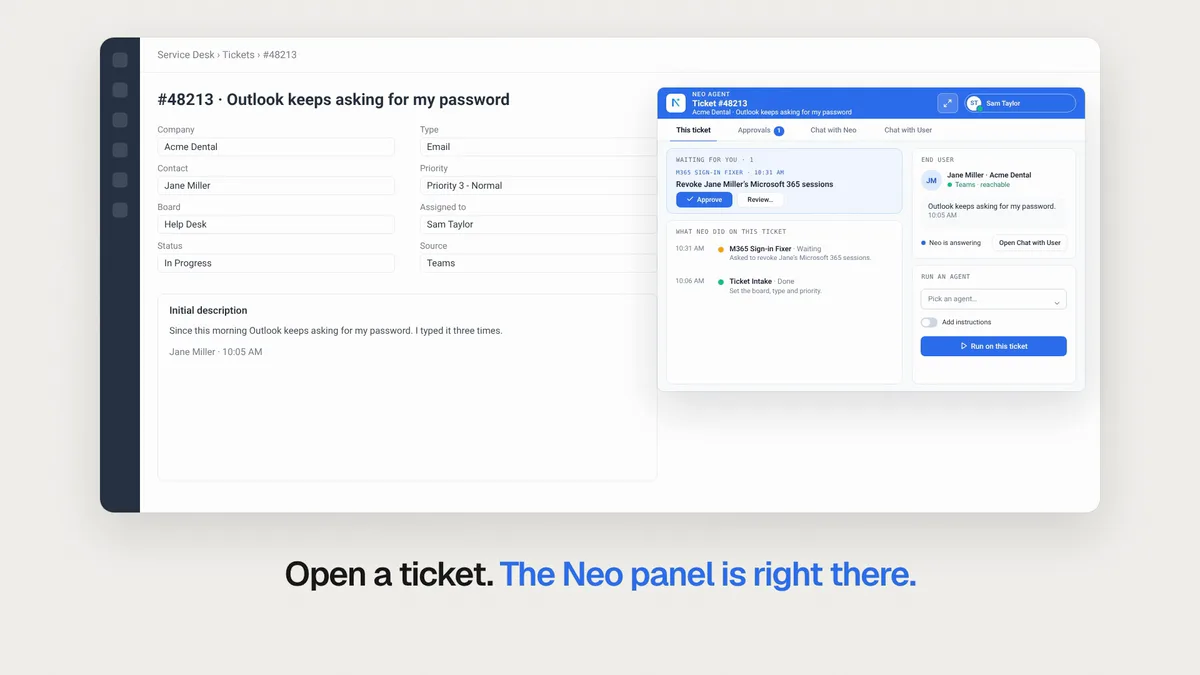
This week, the Neo panel moves onto the ticket in four PSAs, the dashboard gets 12 ready-made templates for the service desk, Insights shows how much of each ticket type Neo already does, and Neo connects to 30 more tools. Here's what shipped and why it matters for your service desk.
The Neo panel is on the ticket in 4 PSAs
Your technicians live in the ticket, so Neo moved in. The Neo panel now sits on the ticket in ConnectWise, Autotask, HaloPSA and ServiceNow. From there a technician can:
- Approve what Neo asks to do.
- See what Neo already did on the ticket.
- Run an agent on the ticket.
- Ask Neo about the ticket.
It signs in with your PSA login, so there is no second sign-in. An admin turns it on under Integrations, on your PSA's Neo tab. Panel setup docs.
Turn on the Neo panel or watch the 52-second video.
12 ready-made dashboards for your service desk
New dashboard now opens a library of 12 templates for the service desk, in 6 areas: overview, ticket aging and follow-up, dispatch and workload, volume and trends, technician performance, and SLA and response. Three to start with:
- Service Desk Command Center shows everything the desk is carrying and what needs a person now.
- Stale Tickets by Technician shows which tickets have gone quiet and whose they are.
- SLA Breach Watchlist lists the tickets that breached or are about to, soonest first.
Preview a template on sample data, press Set up with Neo, and Neo builds it on your own PSA. Neo asks only what the template leaves to you, such as how many days make a ticket stale.
Pick a template or watch the 53-second video.
See how much of each ticket type Neo already does
Insights now splits each of your recurring ticket types into 5 stages: Intake, Route, Resolve, Follow-up and Document. Each stage shows whether your team or Neo does the work.
Neo checks the tickets every night, so you see the figure move after you change an agent. It also writes a plan each night for the 20 ticket types with the most hours left: pick the stages to raise, and Adjust with Neo hands the plan to Neo Support. The By integration tab shows which tool to connect next. Insights is free.
Open Insights or watch the 57-second video.
30 new integrations
These tools went live this week, each with the jobs Neo can do in it:
| Tool | What Neo can do |
|---|---|
| SimpleHelp | Runs Toolbox tools on machines, reads machines and alerts, and checks remote session history. |
| Level | Reads devices, inventory, alerts and patches per customer, and runs automations. |
| PRTG | Reads sensors, alarms and history, and pauses monitoring for planned work. |
| GoDaddy | Audits domains, DNS records, nameservers, SSL and renewals, and manages DNS. |
| IRONSCALES | Finds, checks and releases a user's blocked email, per client company. |
| 8x8 | Manages a client's 8x8 users, extensions, ring groups, numbers and sites. |
| GoTo Connect | Sees who is on a call, reads call history, transcripts and queues, logs calls on the ticket. |
| HPE Aruba Networking Central | Reads alerts, access points, switches and site health, reboots and moves devices. |
| SonicWall Cloud Secure Edge | Reads and manages a customer's zero trust users, devices, trust and roles. |
| Mailprotector | Manages allow and block lists, quarantine and users. |
| ScoutDNS | Reads DNS query logs and roaming clients, and manages allow and block lists. |
| ControlUp | Reads VDI and desktop alerts, statistics and machines, and runs automations. |
| Bigleaf | Reads site, circuit and router status and risks for each customer site. |
| Cork | Reads Cyber Scores, compliance events and vulnerabilities per client. |
| OpenCVE | Looks up CVEs with severity and exploit data, checked against a client's devices. |
| URIports | Checks DMARC policy and alignment per domain, and manages monitored domains. |
| SmileBack | Reads CSAT reviews, NPS and project surveys, per week, technician or customer. |
| RingCX | Reads queue and agent statistics and live agent state, manages agents and queues. |
| Telavox | Reads users, queues, call history and statistics, numbers and desk phones. |
| OnSIP | Reads a client's OnSIP users, phones, numbers and call history. |
| CallSwitch One | Manages a client's CallSwitch One users, call flows, numbers and billing. |
| TD SYNNEX Hardware | Checks price and stock, builds quotes, places orders and reads invoices. |
| D&H Hardware | Checks live price and stock, looks up products and places orders. |
| Dicker Data | Manages Microsoft CSP seats, orders and pricing in Australia and New Zealand. |
| ITCloud.ca | Adds or removes Microsoft 365 seats, orders licences and reads invoices in Canada. |
| MPS Monitor | Reads print fleet supply alerts, toner shipments, devices and counters. |
| ClickUp | Reads and updates tasks, subtasks, checklists, comments and Docs. |
| Float | Checks who is free when, books project time and reads time off. |
| XWiki | Searches and reads your self-hosted wiki, and drafts new pages from tickets. |
| Plaud | Reads meeting recordings, summaries and transcripts from your Plaud Team workspace. |
Open the Integrations directory to connect one.
Smaller improvements worth knowing
A few quick wins also shipped this week:
- Integrations in hours. Ask for a tool Neo does not connect to yet, and it typically ships in a few hours, sometimes up to 2 working days. Open Integrations
- Phone agent costs. See each phone agent's billed minutes, credits and calls per day, under Performance & Cost. Open it
- ConnectWise opportunities. Run an agent when a sales opportunity is created, or its status or stage changes. Docs
- Month-end agents. Schedule a monthly agent to run on the last day of the month. Scheduled agents docs
- Neo on your phone. The dashboard now fits a phone screen, and Train is one tap in run history.
Fixes that landed
- A new agent's schedule now starts in your workspace's timezone, not your browser's.
- PSA ticket updates sent in a large burst no longer get lost before they start an agent.
- Weekly scheduled agents keep their local run time after a daylight-saving change.
- In chat, an agent no longer asks a second time to approve a change you already approved.
- Messages typed to Neo in Teams are no longer lost when Neo is under heavy load.
- Call History now shows whether a transfer reached someone, and no longer says Succeeded when it failed.
- Dispatch now books a free slot later the same day before it moves to the next business day.
- Scheduled agents with slow ConnectWise ticket searches no longer time out and skip runs.
- Autotask triggers on Priority, Ticket Type or Audit Trail changes now fire.
- Agents now find Datto EDR devices and alerts for Datto RMM tickets.
- Agents now check the RMM live before they say a device is offline or missing.
- An RMM write that meets a server error is sent once, so a script never runs twice.
The full changelog lists everything that shipped.
From Builders Lounge
A short clip from Christopher Bledsoe of Agilitec: If you can template it, make it a skill (42 seconds).
Get the invite for the next episode.
Frequently Asked Questions
Where does the Neo panel appear?
The Neo panel sits on the ticket in ConnectWise, Autotask, HaloPSA and ServiceNow. It signs in with your PSA login, so there is no second sign-in.
How do I turn on the Neo panel?
An admin turns it on under Integrations, on your PSA's Neo tab.
How many dashboard templates does Neo have for the service desk?
12 templates, in 6 areas: overview, ticket aging and follow-up, dispatch and workload, volume and trends, technician performance, and SLA and response.
How does Neo build a dashboard from a template?
Preview the template on sample data and press Set up with Neo. Neo builds it on your own PSA and asks only what the template leaves to you, such as how many days make a ticket stale.
What does Insights show for each ticket type?
Insights splits each recurring ticket type into 5 stages: Intake, Route, Resolve, Follow-up and Document. Each stage shows whether your team or Neo does the work.
Already a customer? These updates are live in your workspace now. New to Neo? Book a demo to see how it handles your service desk.