
This week, Neo builds dashboards of your data when you ask, works with your technicians in Slack, takes notes while your help desk answers the phone, and connects to 30 more tools. Here's what shipped and why it matters for your service desk.
Ask Neo for a dashboard of your data
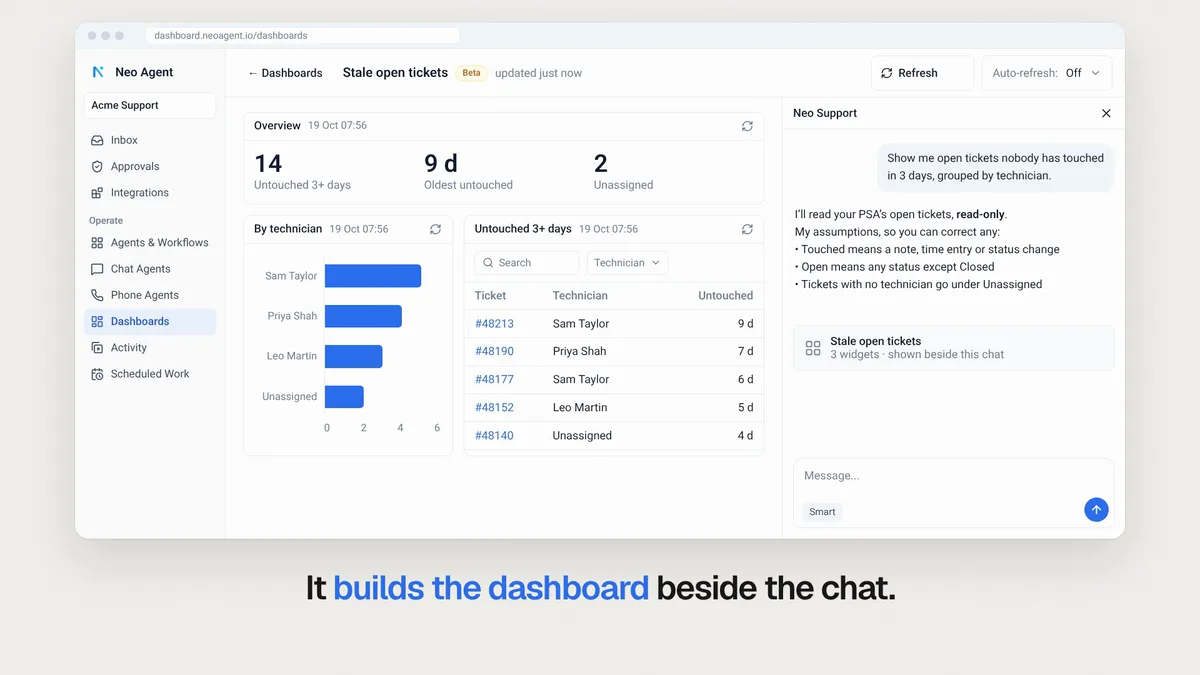
Tell Neo in one sentence what you want to see, such as open tickets nobody has touched in 3 days, grouped by technician. Neo builds the page from your PSA and your other connected tools, with headline numbers, tables and charts.
Dashboards only read your data, cost no credits, and refresh when you ask. Admins build them, and everyone in your workspace can view them. The feature is in beta.
Watch the 39-second video to see one built from a single request.
Your technicians can work with Neo in Slack
Connect Neo's Slack app to your own workspace once, from Integrations. Your technicians then chat with Neo in Slack the way they would in Teams. Approval cards and your agents' messages arrive there too, in a direct message or a channel you pick.
Want your own branded agent in Slack as well? Set up an Internal channel. Connect Slack or watch the 39-second video.
Your help desk answers, Neo takes the notes
Neo's Phone Agent can now stay in the background. Point a Neo number at your help desk, and your technicians answer as usual and see the caller's own number.
After the call, Neo adds the transcript and a summary to the right ticket. It finds the ticket from a ticket number said in the call, or from the caller's open ticket. These calls use no credits for now. Watch the 45-second video.
30 new integrations
These tools went live this week, each with the jobs Neo can do in it:
| Tool | What Neo can do |
|---|---|
| HubSpot | Read and update your HubSpot CRM, and keep contacts and deals in step with your PSA |
| QuickBooks Online | Search invoices, update records and run reports, mapped to your PSA companies |
| Duo | Find a user, verify a caller with a push, clear lockouts, and onboard or offboard users |
| KnowBe4 | Add and archive users with onboarding, read training and phishing results, and triage PhishER reports |
| Acronis Cyber Protect Cloud | Work EDR incidents and backup alerts, and manage users and services per customer |
| Cisco Umbrella | Manage allow and block lists and read reports in each client's Umbrella organization |
| DNSFilter | Report the threats DNSFilter blocked per customer, and allow or block a domain |
| Avanan | Manage allow and block lists, and read security events and tickets per client tenant |
| INKY | Review reported mail, check verdicts, remediate, and manage allow and block lists |
| VirusTotal | Check a hash, URL, domain or IP from an alert, and submit what it has not seen |
| Dark Web ID | Run live dark web searches, work each compromise to resolved, and onboard customers |
| Notion | Search your Notion SOPs, query databases, and create, edit or comment on pages |
| Smartsheet | Read and update project plans, and sync them both ways with Autotask projects |
| Zoho Desk | Read and update tickets, contacts and accounts, and build ticket trend reports |
| VMware vSphere | Read vCenter, and create and manage virtual machines with approval |
| ConnectWise CPQ | Draft a quote from a PSA opportunity, add lines, and ask for approval |
| CyberQP | Verify end users, and create just-in-time admin accounts for a ticket |
| MSP Process | Verify a caller by code or push, send secure links, and see who is on call |
| Field Effect MDR | Read, comment on, resolve and dismiss AROs, and look up endpoints |
| FortiMail | Trace mail delivery, search logs and release quarantined mail for a client's domains |
| iboss | Read URL logs and reports, and manage allow and block lists and policies |
| Nextiva | Manage call center agent state, queues, call logs and call settings |
| Redstor | Confirm backup failures and close the ticket once every failed account backs up |
| Jotform | Read form submissions and act on the request each one carries, like a new starter |
| Petra Security | Read Microsoft 365 compromise incidents, failed attacks and posture reports per client |
| AbuseIPDB | Check an alert's IP addresses against abuse reports, and report attackers |
| Moovila | Read project health, risk, budgets and time, and estimate team capacity |
| Pia | Run Pia automations on a ticket and follow each run to its result |
| Samsara | See vehicle locations, time spent on client sites, and driver details |
| OpenWeather | Check storms, weather alerts and past weather at a client site |
Open the Integrations directory to connect one.
Smaller improvements worth knowing
A few quick wins also shipped this week:
- Know the cost first. Before a scheduled agent turns on, see its estimated daily credits, and confirm an expensive one. Scheduled agents docs
- Viewers can run agents. A Viewer can now use Run now on the agents and workflows shared with them, without edit rights. Roles docs
- Agents that wait for agents. An agent that starts a workflow now pauses until it finishes, approvals included, then carries on. Docs
- Call your phone agent from the browser. Test a change before you save it, with no number needed and no credits.
- Transfer, then voicemail. One phone agent can put a caller through to on-call, then on to voicemail if nobody answers. Docs
- Clear old approvals. Dismiss every pending approval request older than a day you pick, in one go.
- Invoices for your accounts team. Add up to 10 CC addresses on the Billing page, and each one gets every paid invoice.
The full changelog lists everything that shipped.
From Builders Lounge
Two short clips from Ryan Rolph's recent session:
- A skill that grades every closed ticket (34 seconds): if it isn't documented, it didn't happen.
- Why each agent gets only the tools for its job (50 seconds): one agent per job keeps least privilege.
Get the invite for the next episode.
Frequently Asked Questions
Do dashboards cost credits?
No. Dashboards only read your data, cost no credits, and refresh when you ask.
Who can build and view dashboards?
Admins build dashboards, and everyone in your workspace can view them.
How does Neo find the right ticket for a help desk call?
Neo looks for a ticket number said in the call. If there is none, it uses the caller's open ticket.
Do help desk note-taking calls use credits?
Not for now. These calls use no credits.
How do I connect Neo to Slack?
Open Integrations in your dashboard and connect Neo's Slack app to your workspace once. Your technicians can then chat with Neo in a direct message or a channel you pick.
Already a customer? These updates are live in your workspace now. New to Neo? Book a demo to see how it handles your service desk.