
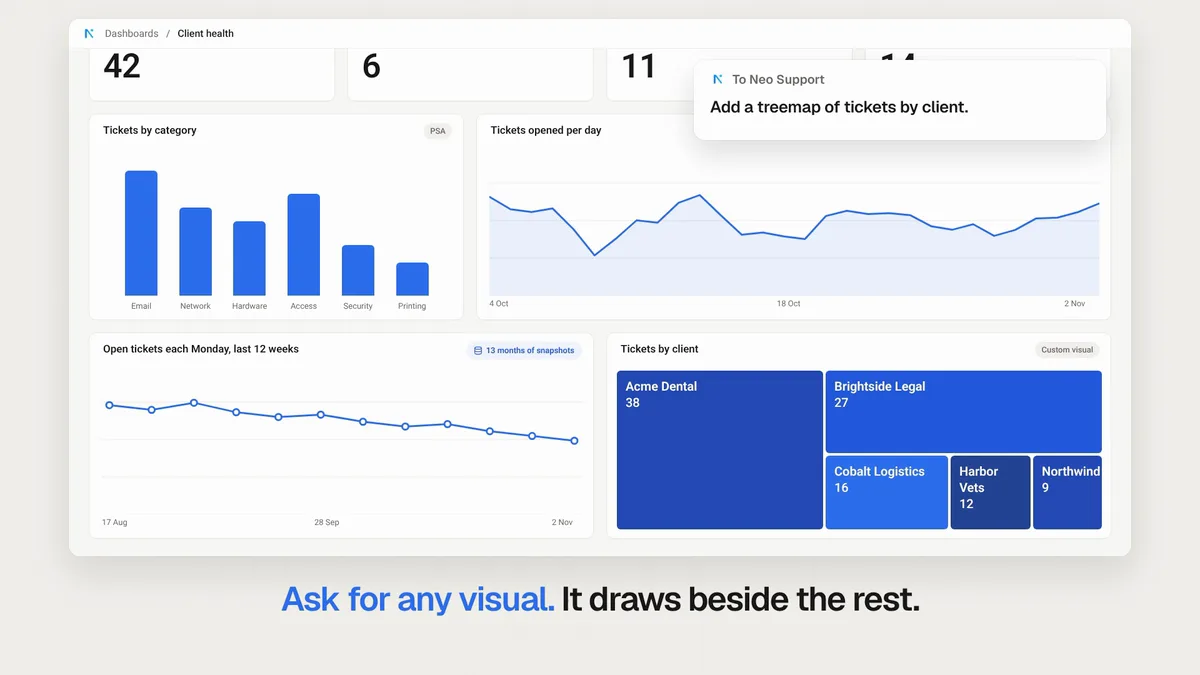
This week, Neo's client dashboard grew into a live report you can filter, schedule and share, a memory now holds a whole SOP, agents work through CIPP for Microsoft 365 with no GDAP, and Neo connects to 38 more tools. Here's what shipped and why it matters for your service desk.
Build your client report once, and keep it live
Your numbers sit in your PSA, RMM, security tools and Microsoft 365, and the monthly client report still gets built by hand. Ask Neo once and you get one live client dashboard across all of them. This week it grew up:
- Filter by client or period, and click any number to see the tickets behind it.
- Refresh it on a schedule, and keep trends your PSA does not store.
- Ask for any chart you want on the page.
- Brand it in your own colours.
- Share it by link, on the office TV or with the client.
Build your client dashboard or watch the 1 minute 32 second video.
Your whole SOP, in one memory
A memory now holds up to 10,000 characters, so a full SOP fits, and one memory can cover several companies. You do not need to pin it. Neo sees a one-line description of every memory and opens the right one when the ticket needs it, 98% of the time in our tests.
Every agent reads the same memories, from triggered agents to your end-user chat and the Phone Agent. Memory docs.
Save your first SOP or watch the 53-second video.
Already on CIPP? That's your Microsoft 365 connection
Connect CIPP once and Neo's agents work your clients' Microsoft 365 tickets through it: reset MFA, revoke sessions, release quarantined mail, and offboard a user with every wizard option you pick. Agents that work through CIPP need no GDAP and no Grant access.
Neo maps your CIPP tenants to your PSA companies, and now you confirm every exact match in one go. Connect CIPP or watch the 51-second video.
38 new integrations
These tools went live this week, each with the jobs Neo can do in it:
| Tool | What Neo can do |
|---|---|
| CrowdStrike | Checks that computers are in Falcon on the latest sensor, works alerts and contains hosts. |
| Veeam Backup & Replication | Reads each job's sessions, retries failed jobs, checks repository space and starts restores. |
| Veeam Backup for Microsoft 365 | Reads each Microsoft 365 backup job and its sessions, reruns what failed and restores lost items. |
| Xero | Finds and reports on invoices, bills, payments and balances, and updates records as you allow. |
| FortiGate | Reports on every customer's FortiGates and contracts, reads their logs and status, and changes them. |
| LogicMonitor | Reads LogicMonitor alerts and resource data, acknowledges alerts and schedules downtime. |
| ImmyBot | Finds the computer in ImmyBot and runs the software change the ticket needs. |
| RingCentral | Reads and changes RingCentral users, call handling, queues, call logs, devices and numbers. |
| Commvault | Reads job failures and alerts, controls jobs and clients, checks storage and starts restores. |
| CloudRadial | Designs and edits CloudRadial request forms, and reads and updates each client's portal. |
| SolarWinds Orion | Reads nodes, alerts and statistics in Orion, acknowledges alerts and mutes or unmanages nodes. |
| Fathom | Reads Fathom's meeting summaries, action items and transcripts, and acts on them in your PSA. |
| Ninety | Reads and updates Ninety's To-Dos, Issues, Rocks and Scorecard, and joins them to your PSA. |
| Strety | Reads and updates Strety's Goals, Milestones, To-Dos and Issues, and tracks them against your PSA. |
| Inforcer | Reads each client's secure score, baseline alignment, policies and reports in Inforcer. |
| FortiManager | Reads each customer's FortiGates, policies and web filter through FortiManager, and changes them. |
| NinjaOne SaaS Backup | Reads each customer's Microsoft 365 and Google Workspace backups, seats and storage. |
| Exclaimer | Reads and changes each client's Exclaimer subscription: tier, SKU, mailbox count and users. |
| Simplesat | Reads Simplesat's survey responses, sends surveys by email, and keeps customers and team members current. |
| TeamGPS | Reads TeamGPS CSAT, CES and NPS results, scorecards, recognition, goals and meetings. |
| Paycor | Reads Paycor employees, time cards and time off, and compares hours worked with your PSA time. |
| Zomentum | Drafts quotes and proposals from your templates and catalog, and follows your opportunities. |
| Smart Pricing Table | Reads and builds Smart Pricing Table proposals: pages, pricing, add-ons and packages. |
| Ingram Micro Hardware | Finds Ingram Micro products, reads live price and stock, and builds quotes and orders. |
| Airlock Digital | Reads agents, policy groups and blocked files, issues OTP codes and allows or blocks hashes. |
| DefensX | Answers DefensX user requests, keeps each client's allow and block lists, and reads browsing logs. |
| Todyl | Reads each client's Todyl devices, who uses them and how they break down. It changes nothing. |
| RocketCyber | Reads the RocketCyber incident behind a ticket and advises the technician. It changes nothing there. |
| Parallels RAS | Reads farm and host health, drains hosts, logs off sessions and publishes applications. |
| Omnissa Horizon | Builds and manages Horizon desktop pools and machines and gives users their desktops. |
| Kemp LoadMaster | Reads virtual service, real server and appliance health, and enables or disables servers. |
| SASBOSS | Adds and removes users, Teams calling and phone numbers in SASBOSS for each customer. |
| SkySwitch | Adds and removes users, extensions and numbers in SkySwitch, and counts seats. |
| Trend Micro LMP | Reads and changes each client's TrendAI subscriptions in LMP: plans, seats, dates and usage. |
| RoutIT / KPN | Adds and removes Microsoft 365 seats on RoutIT and KPN orders, and reads each customer's orders. |
| ELMO | Reads and updates staff in your customers' ELMO: managers, departments, start dates and onboarding. |
| GlassHive | Builds GlassHive lists from your PSA or CRM, updates contacts and companies, and drafts campaign copy. |
| Pushover | Sends Pushover alerts for urgent tickets and checks that each one was acknowledged. |
Open the Integrations directory to connect one.
Smaller improvements worth knowing
A few quick wins also shipped this week:
- Autotask checklists. Ticket Triage attaches the right checklists from your Checklist Library to each new ticket. Docs
- Private Teams channels. Agents read a Team's private channels, and post there once you add the app to the channel. Teams docs
- Triage sees bookings. Neo reads a ticket's schedule entries and appointments, so a rule can use the booked date. Docs
- Tools your tickets need. The Integrations page opens on your connected tools and suggests the ones your tickets ask for. Open Integrations
- A client's own key. A client that licenses a tool directly? Add its key beside your partner key, and Neo uses it on that client's tickets. Docs
- One customer, several companies. Map one Pax8 or other marketplace customer to each PSA company it bills, such as a client's sites. Docs
Fixes that landed
- Agent runs no longer fail when Neo deploys an update while they run.
- Agents no longer offer inactive Autotask or ConnectWise technicians as assignees.
- In Teams and Slack, the idle timer now starts after Neo replies, so Start fresh stops appearing early.
- Long answers in Teams and Slack now arrive, with no repeated fallback messages.
- The Phone Agent no longer says it will create a ticket or transfer without doing it.
- A re-dispatch no longer creates duplicate schedule entries for a booking the ticket already has.
- After a clock change, dispatch books ConnectWise and Autotask technicians at the correct hour.
- Two agents updating the same ConnectWise ticket at once no longer undo each other's board or status.
- Agents now see every ConnectWise ticket custom field, not only the first 25.
- Dispatch now skips HaloPSA technicians on their Workday holidays.
- Non-billable time entries that agents log in Halo now stay non-billable.
- Dashboards with wide tool access refresh again, where every widget failed before.
The full changelog lists everything that shipped.
From Builders Lounge
Two short clips from Christopher Bledsoe of Agilitec:
- If you can write docs, you can build skills (46 seconds)
- 161 skills in about two months (28 seconds)
Get the invite for the next episode.
Frequently Asked Questions
Can I share a Neo client dashboard with my client?
Yes. Share the dashboard by link, on the office TV or with the client. You can also put it in your own brand colours.
Can a Neo dashboard refresh on a schedule?
Yes. Refresh it on a schedule, and keep trends your PSA does not store.
How much can a Neo memory hold?
A memory holds up to 10,000 characters, so a full SOP fits, and one memory can cover several companies.
Do I need to pin a memory so agents use it?
No. Neo sees a one-line description of every memory and opens the right one when the ticket needs it. Every agent reads the same memories, including your end-user chat and the Phone Agent.
Do I need GDAP to use Neo with CIPP?
No. Agents that work through CIPP need no GDAP and no Grant access. Connect CIPP once and Neo works your clients' Microsoft 365 tickets through it.
Already a customer? These updates are live in your workspace now. New to Neo? Book a demo to see how it handles your service desk.