
This week, Neo sends its approval requests to the technicians who work the ticket, opens a simpler template gallery for your next agent, keeps every earlier version of a memory so you can undo a change, and connects to 17 more tools. Here's what shipped and why it matters for your service desk.
Approvals go to whoever works the ticket
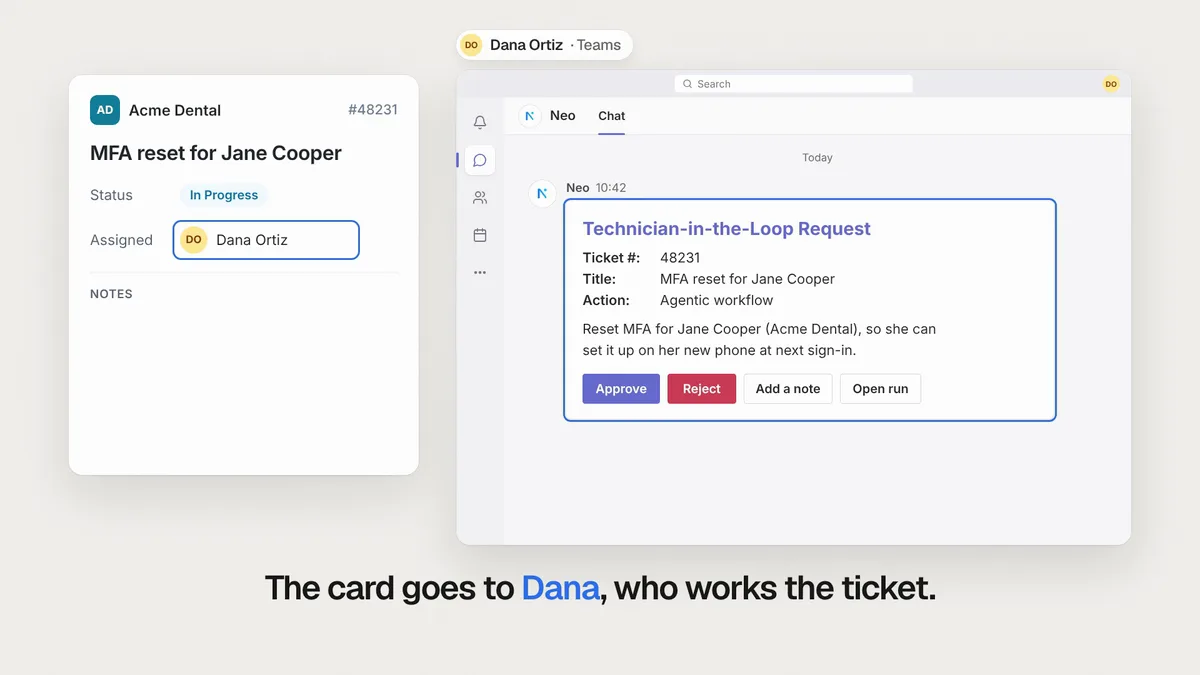
When an agent asks before it acts, the request used to go to one fixed list of approvers. Now you can set Who receives approval requests, on the agent's approval tool, to the ticket's assigned technicians.
The card reaches them in Teams or Slack, and it follows the ticket when someone else takes it, so a new hire needs no change to the agent. If Neo cannot reach anyone on the ticket, the approvers you picked still get it. Technician in the Loop docs.
Set it up with Neo or watch the 52-second video.
Find your next agent in the template gallery
In Agents & Workflows, press New, then From a template. The gallery opens on Popular, the templates the Neo team recommends as a good place to start. Search by name, task or integration, or pick a category such as Microsoft 365.
Open a card to see what it does, when it runs and which integrations it needs. Press Set up with Neo, and Neo asks a few questions about your boards, statuses and approvers, then builds it switched off for you to review. Templates docs.
Open Agents & Workflows or watch the 42-second video.
Undo a change to a memory
Memories change as you correct Neo, and sometimes an edit drops a detail you still needed. On the Memory page, open a memory and press History: every earlier version is there, with its date.
Restore loads one into the editor, and Save makes it current again as a new version, so nothing is lost. Memory docs.
17 new integrations
These tools went live this week, each with the jobs Neo can do in it:
| Tool | What Neo can do |
|---|---|
| Cloudflare | Reads and fixes your Cloudflare DNS, zone settings, Zero Trust policies and tunnels. |
| ConnectSecure | Reads a client's ConnectSecure risks, patches and compliance, and turns new ones into tickets. |
| BambooHR | Reads each customer's BambooHR to start onboarding and account changes. |
| MSP360 | Reads MSP360 backup status and plan history, and starts, stops and changes backup plans. |
| Phin Security | Reads each customer's Phin users, phishing clicks, training and campaigns, and manages users. |
| Autodesk | Invites users to a customer's Autodesk team, assigns and frees product seats, and reports seat use. |
| Mesh | Searches Mesh's email tracker, says why a message was blocked, releases it, and allows or blocks senders. |
| FedEx | Tracks FedEx parcels from the ticket, creates return and shipping labels and books return pickups. |
| Overe | Reads a customer's Overe posture, GSO tasks and identity alerts, and signs a user out with approval. |
| Senteon | Reads each endpoint's Senteon configuration health, compliance, drift and alarms per customer. |
| Bluebeam | Creates and deactivates Bluebeam users and assigns, changes and frees their Revu plans per customer. |
| MainWP | Finds a client's WordPress site in MainWP and reads its versions, updates and last sync. |
| Tier2Tickets | Matches a button ticket to its PC, checks its group, status and agent, and acts on the endpoint. |
| Manage Protect | Reads each customer's Manage Protect seats and invoices, changes seats and buys licences. |
| ANS | Reads your ANS domains, DNS, eCloud servers and support cases, and acts on them for you. |
| ICUK | Reads and manages your customers' ICUK broadband, VoIP, domains, hosting and email. |
| Vodafone Business Netherlands | Blocks, unblocks and replaces business SIMs and eSIMs, and cancels subscriptions. |
Open the Integrations directory to connect one.
Smaller improvements worth knowing
A few quick wins also shipped this week:
- None, in one click. A new None preset turns off every permission of an integration on an agent, so you switch on only what it needs. Docs
- Notices to the right people. Send an end-user notification only to companies of the PSA types you pick, or to contacts of chosen types. Open Notifications
- See what users attached. Chat History now shows the screenshots and files end users sent, with full-size previews. Open Chat History
- Export a chat. Download a whole conversation from Chat History as a Markdown file. Open Chat History
- Keep vendor keys out of Neo. Route Datto RMM, IT Glue, Huntress and 3 more through your own API proxy, which holds the real keys. API proxy docs
- Parent company contracts. Ticket Triage can also offer the Autotask parent company's contracts, with a new setting. Docs
- ConnectWise replies caught. Customer replied triggers now catch the replies they missed when a note saved a moment early. Trigger docs
Fixes that landed
- The Run Every box on scheduled agents and workflows now keeps the number you type.
- A ticket agent now acts on a customer's reply even after an earlier run limited its scope.
- A PSA permission or login refusal on a triggered agent now shows how to fix it in your PSA.
- A scheduled agent can now dismiss approval requests that need no decision, such as those on closed tickets.
- The end-user bot now asks its question in the message, with the answer buttons shown below it.
- Dispatch now checks the picked technician's day rules, so it stops booking over all-day client visits.
- Agent reports compute every count from the data, and a corrected report replaces a wrong one.
- Agents can create, rename, offboard and restore Google Workspace users through WOSP, and reset 2-Step Verification.
- An IT Glue, Hudu or Lexful write is no longer sent 3 times when the vendor has a server error.
- Customer replied no longer fires on a portal note or a merged-in note when a ticket opens.
- Filter Autotask tickets by days since completion, which restarts when a ticket reopens.
- The Phone Agent now recognizes Halo callers who ring from their own phone or mobile number.
The full changelog lists everything that shipped.
Frequently Asked Questions
How do I send an agent's approval requests to the technicians on the ticket?
On the agent's approval tool, set Who receives approval requests to the ticket's assigned technicians. You can also ask Neo to set it up for one of your agents.
What happens when the ticket moves to another technician?
The approval card follows the ticket, so it reaches whoever works it now, in Teams or Slack. A new hire needs no change to the agent, and if Neo cannot reach anyone on the ticket, the approvers you picked still get the request.
Where do I find the template gallery?
In Agents & Workflows, press New, then From a template. Search by name, task or integration, or pick a category, and open a card to see what it does, when it runs and which integrations it needs.
Does Set up with Neo turn the new agent on?
No. Neo asks a few questions about your boards, statuses and approvers, then builds the agent switched off for you to review.
Can I get back an earlier version of a memory?
Yes. Open the memory on the Memory page and press History. Restore loads an earlier version into the editor, and Save makes it current again as a new version, so nothing is lost.
Already a customer? These updates are live in your workspace now. New to Neo? Book a demo to see how it handles your service desk.