
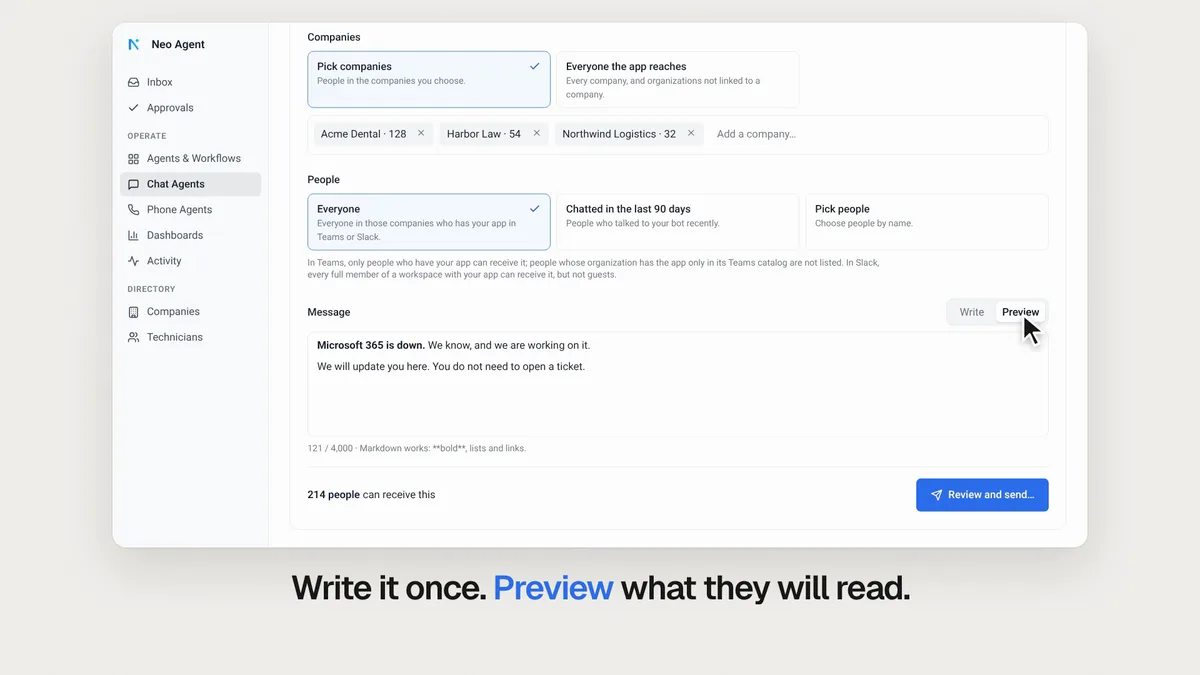
This week, Neo can send one message to every client's end users in Teams and Slack, checks your agents' instructions for rules that conflict, makes a clean copy of any agent you share, and connects to 32 more tools. Here's what shipped and why it matters for your service desk.
One message to every client's users
When Microsoft 365 goes down, all your clients want to hear from you at once. If they chat with your Teams or Slack bot, you can now tell them in one step: on the Notifications tab under Chat Agents, pick the companies, see how many people each one reaches, and send.
The message lands in each person's chat with your own Teams bot, or as a Slack message from your app, and you see who got it. You can also ask Neo: "Tell everyone at Acme Dental that Teams is down." Notifications docs.
Send a notification or watch the 52-second video.
Neo checks your agent's instructions
Instructions grow one fix at a time, until two rules disagree and nobody notices. Press Validate & optimize, next to Adjust with Neo, and Neo reads the agent's instructions and the pinned memories it follows.
Neo flags:
- Rules that conflict with each other.
- Rules a run can read two ways.
- Rules buried in long paragraphs.
Then it proposes a cleaner version one section at a time. Nothing changes until you confirm. Validate & optimize docs.
Check an agent or watch the 50-second video.
Share any agent safely, in one click
When you share an agent, Neo now makes a clean copy first: client names, people, emails, links, phone numbers and secrets become placeholders such as [client]. Rules remove the names in your PSA, and an AI check finds the ones they miss.
You review every replacement before the link goes live, and the link shows only that copy. Your instructions, filters and tool settings stay, so other MSPs see how the agent works and never see your clients. Sharing docs.
32 new integrations
These tools went live this week, each with the jobs Neo can do in it:
| Tool | What Neo can do |
|---|---|
| PagerDuty | Raises PagerDuty incidents from tickets on the rules you set, and keeps them in step with the ticket. |
| GitLab | Reads and commits files in your GitLab repositories, and works merge requests, issues and pipelines. |
| Dell Warranty | Reads Dell's warranty and support coverage for each service tag, live from Dell. |
| HP Warranty | Checks the warranty and Care Pack coverage of HP devices by serial number, live from HP. |
| Lenovo | Reads Lenovo warranty and service coverage, with end dates, straight from Lenovo. |
| Nerdio Manager | Finds the user's session and session host, and checks or fixes what the ticket needs. |
| Blackpoint Cyber | Reads each customer's detections and Cloud Response, and allows a user's trip. |
| Mailgun | Sends email through your Mailgun domain and reads what was delivered, bounced or blocked. |
| UPS | Creates shipping and return labels, tracks parcels and books pickups from the ticket. |
| GitBook | Searches and reads your GitBook pages, and drafts page updates in change requests for review. |
| Control D | Checks whether Control D blocked a site and why, allowlists it, and reports blocked queries. |
| Cradlepoint NetCloud Manager | Reads your customers' routers: status, failovers, signal and speed. |
| endoflife.date | Reads end of life and end of support dates for each OS, app and device release. |
| HPE GreenLake | Reads HPE warranty and support end dates by serial, adds devices and opens support cases. |
| Fireflies | Reads meetings, matches each to its client, and keeps what matters as memory. |
| Bicom PBXware | Manages extensions, IVRs and ring groups, and reads call records and transcripts. |
| bVOIP | Reads voicemail, call history and phone system status, and manages extensions and routing. |
| DrayTek VigorACS | Reads your customers' Vigor routers, which are offline and their settings, and reboots one. |
| Scale Computing HyperCore | Reads each VM's vCPU, memory and snapshot schedule, and reboots, snapshots and clones VMs. |
| TridentStack | Reads each endpoint's health, updates, CVEs and compliance, and installs on approval. |
| LOLRMM | Checks each device's installed software against a catalog of abused remote access tools. |
| Breach Secure Now | Reads each client's secure score, phishing fail rate, breaches and training, per user. |
| MSPortal | Reads Client Health, CSAT, NPS and Traffic Light to flag clients at risk of churn. |
| WOSP | Works in your customers' Google Workspace tenants through your own WOSP. |
| Evernex Backup Portal | Reads each customer's backup jobs, their sessions and errors, and its licence and storage use. |
| ManicTime | Compares what your technicians worked on with the time logged in your PSA. |
| Social Intents | Reads chat transcripts, missed chats, offline messages and leads. |
| Streakwave | Reads your price, MSRP and live stock per warehouse for any part. |
| Rise People | Reads who is away, and leaves technicians on booked leave out of ticket dispatch. |
| AFAS Profit | Reads and changes subscriptions, debtors, items and invoices in your AFAS environment. |
| Docusaurus | Syncs your Docusaurus site daily, up to 5,000 pages, and suggests the right page on each ticket. |
| DfE Financial Benchmarking | Reads the published spending of each school in England, such as ICT and IT support. |
Open the Integrations directory to connect one.
Smaller improvements worth knowing
A few quick wins also shipped this week:
- Skill folders. Put your AI skills into folders, like agent groups, from each skill's menu on the Skills page. Open Skills
- Priority in the title. Ticket Triage can write the title last, so it can add the priority it just set, like "Printer offline | High". Docs
- Your Action Required emails. Choose who gets them, under Settings, Alerts. Open Alerts
- Costliest runs first. On Executions, sort a period's runs by the credits they used. Open Executions
- Dispatch keeps to working hours. Neo now books inside the chosen technician's own hours for every tenant, unless your instructions allow otherwise. Dispatch docs
Fixes that landed
- An agent now starts on a technician's note added shortly after its last run on that ticket.
- Agent runs now recover when the AI service fails mid-run, and never repeat a change after a restart.
- Approval cards for RMM scripts now name the script and device, not internal ids.
- Neo Support no longer turns off an agent's other permission groups when it turns one on.
- Phone Agent now works on ServiceNow and Syncro: tickets, notes and caller lookup.
- Live phone calls are no longer cut off when we deploy a new version.
- When your PSA rejects Neo's credentials, Neo pauses calls, sends one notice, and resumes once fixed.
- Pax8 calls no longer fail with an auth error when Pax8 ends a session early.
- Find Ticket to merge with can now search every board, and Merge Ticket moves the ticket there.
- Very large Halo tickets, with big inline images, no longer lose their updates to Neo.
- NinjaOne script runs are now tracked even after the script was renamed in NinjaOne.
- Pick a 24-hour clock with the day first, under the new Date and time format setting.
The full changelog lists everything that shipped.
Frequently Asked Questions
How do I send one message to all my clients' end users?
Open the Notifications tab under Chat Agents, pick the companies, see how many people each one reaches, and send. You can also ask Neo, for example: "Tell everyone at Acme Dental that Teams is down."
Where does the notification arrive?
It lands in each person's chat with your own Teams bot, or as a Slack message from your app, and you see who got it.
What does Validate & optimize check?
Neo reads the agent's instructions and the pinned memories it follows. It flags rules that conflict, rules a run can read two ways, and rules buried in long paragraphs, then proposes a cleaner version one section at a time.
Does Validate & optimize change my agent on its own?
No. Nothing changes until you confirm.
What does Neo remove when I share an agent?
Client names, people, emails, links, phone numbers and secrets become placeholders such as [client]. You review every replacement before the link goes live, and your instructions, filters and tool settings stay.
Already a customer? These updates are live in your workspace now. New to Neo? Book a demo to see how it handles your service desk.