
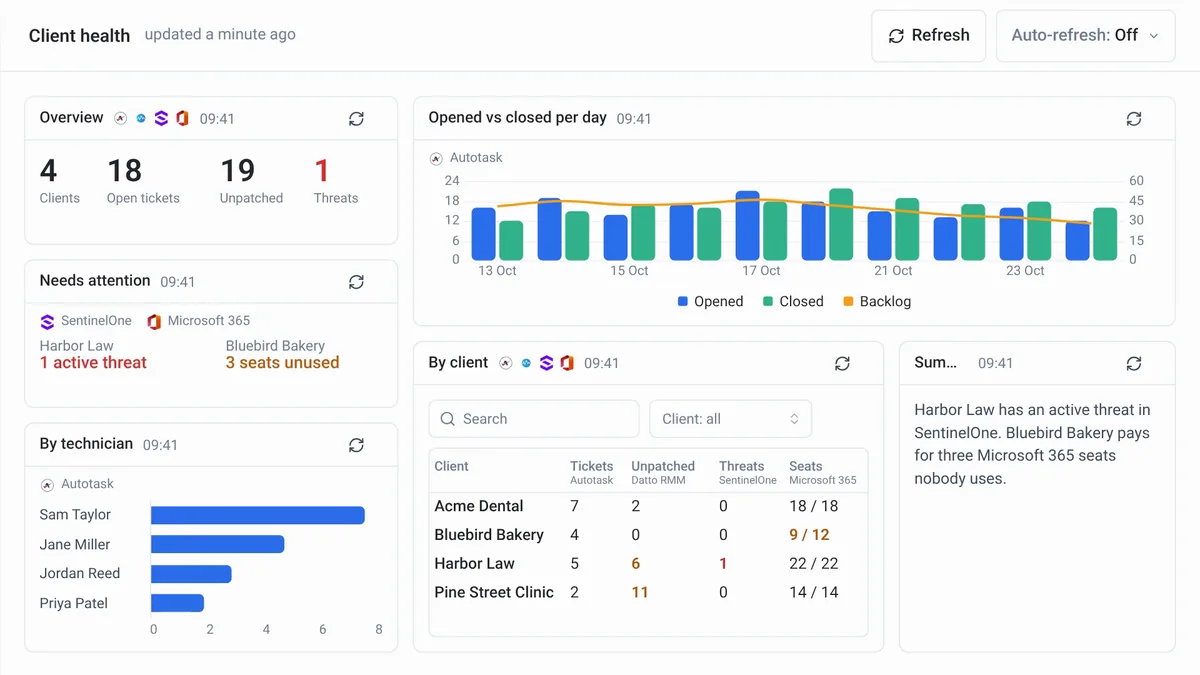
This week, Neo builds one dashboard from all your connected tools for the office wall, lets you test an agent on a ticket you write yourself, lets you connect a tool without leaving the agent you are building, and connects to 27 more tools. Here's what shipped and why it matters for your service desk.
One client health dashboard across all your tools
Tell the Neo Support Agent in one sentence what you want to see, and Neo builds it from all your connected tools at once: tickets from your PSA, patches from your RMM, threats from your security tools, and seats from Microsoft 365.
Neo already knows which client is which in each tool, so every client gets one row, and what needs attention stands out. A client health dashboard can show each client's open tickets from Autotask, unpatched devices from Datto RMM, threats from SentinelOne, and Microsoft 365 seats used against seats paid, next to an opened vs closed chart.
Press Present and the dashboard opens in a new tab with no menus or chat, ready for the office wall.
Build a client health dashboard or watch the 57-second video.
Test an agent on a ticket you write yourself
No ticket in your PSA fits the agent you are building? In Run now, choose Test ticket and write one: a title, a description, the company and, if you like, a contact.
Neo works on it as on any ticket of that company, and its changes to the ticket stay in the run. Everything else Neo does is real, such as emails and Microsoft 365 or RMM changes, so turn on Supervised run to approve each one first. How test tickets work.
Connect a tool without leaving your agent
An agent's Tools tab now lists your tools under the same sections as the Integrations page, and a category with nothing connected names the tools you can add there. Click one, set it up in the pop-up, close it, and switch on its permissions. Your unsaved changes to the agent stay where they were.
Open your agents or watch the 43-second video.
27 new integrations
These tools went live this week, each with the jobs Neo can do in it:
| Tool | What Neo can do |
|---|---|
| Okta | Create and offboard users, reset passwords and MFA, and assign apps per customer |
| SonicWall | Report on every customer's firewalls, schedule firmware and restarts, and read rules |
| 3CX | Add and remove users on each customer's 3CX as part of onboarding and offboarding |
| Liongard | Turn new alerts into PSA tickets, and read each customer's alerts and changes |
| Veeam Service Provider Console | Read each alarm and its job, retry it, check the next run and resolve the alarm |
| Cove Data Protection | Read each device's sessions and errors, start backups through your RMM and flag reboots |
| Axcient x360 | Read each backup job, its runs and AutoVerify tests, and report what failed and why |
| Adobe Admin Console | Create and remove Adobe users, assign and reclaim licences, and report seats per customer |
| Acronis Email Security | Find a user's email, read its verdict, release it from quarantine, and block phishing |
| Keepit | Read each connector's health and failed jobs, and start a backup after a fix |
| Slide | Read each alert and the backups since, and resolve what has recovered |
| Nutanix | Read what each VM uses in Prism Central, and change CPU, memory and disks |
| Datto Networking | Read each device's status, check-in, model and subscription, and reboot one |
| Discord | Post messages and approval requests in your channels and DMs, and read the answers |
| SIGNL4 | Raise alerts for urgent tickets, and see when each was delivered and acknowledged |
| usecure | Tell usecure's own emails from real phishing, keep learners in step, and read results |
| Zorus | Count each customer's Zorus endpoints, and work the unblock requests your users send |
| ArrowSphere | Add and remove seats, schedule cuts for the renewal date, and read licences |
| Elevate | Add users with a licence, a number and an extension, and remove leavers |
| Call Harbor | Read call history, queue and agent statistics, and manage users and devices |
| Password Link | Share each new or reset password as a secret link |
| Dayforce | Read each customer's Dayforce to start onboarding from the HR record |
| HighLevel | Read and update contacts, businesses and opportunities, and send marked leads to your PSA |
| ZOEY | Find the caller's account, services and bills, and make the change they confirm |
| GeoCerts | Read your certificate orders, their status and expiry dates |
| Crewhu | Read CSAT surveys, badges and prizes, and update contest results |
| WorkTime | Read active, idle and productive time per technician, and report it |
Open the Integrations directory to connect one.
Smaller improvements worth knowing
A few quick wins also shipped this week:
- Read any run in English. A run in another language gets an English button at the top. It costs no credits. Executions docs
- Email the CC list too. Notify Ticket's Contact can also email everyone on a ConnectWise ticket's CC list. Docs
- SharePoint files, read. Agents now get the text of PDF, Word and Excel files in SharePoint, not an empty result. SharePoint docs
- See how a call flows. Each phone agent mode now shows a call-flow diagram and a setup checklist.
- Sharper ticket categories. A new Savings by category report gives SharePoint access, licence renewals and device retirement their own rows.
Fixes that landed
- Ticket summaries now state only what the ticket notes say, with no invented causes or outcomes.
- Agent time entries on a ticket no longer overlap or appear before the reply they log.
- Agents now read screenshots pasted inline in Halo and ConnectWise notes, and say when one could not be read.
- When 2 dispatches race for one slot, Neo books the next free opening, not an hour later.
- Dispatch no longer skips tickets that only mention onsite work, unless your instructions say to.
- Agents now see every note on Halo tickets with more than 50 actions, the oldest included.
- Agents no longer assign a ServiceNow ticket to someone outside its Assignment Group.
- A planned plan change no longer disables your account or charges you twice.
- Turning on auto top-up now buys credits at the next hourly check, so agents do not stay blocked.
The full changelog lists everything that shipped.
Frequently Asked Questions
How do I build a client health dashboard in Neo?
Tell the Neo Support Agent in one sentence what you want to see. Neo builds it from your connected tools, such as your PSA, RMM, security tools and Microsoft 365.
How do I put a Neo dashboard on the office wall?
Open the dashboard and press Present. It opens in a new tab with no menus or chat.
Can I test an agent without a real ticket?
Yes. In Run now, choose Test ticket and write a title, a description, the company and, if you like, a contact. Neo works on it as on any ticket of that company.
Does a test ticket change anything in my systems?
Neo's changes to the ticket stay in the run. Everything else it does is real, such as emails and Microsoft 365 or RMM changes, so turn on Supervised run to approve each one.
How do I connect a tool while I build an agent?
Open the agent's Tools tab, click a tool, set it up in the pop-up, close it, and switch on its permissions. Your unsaved changes to the agent stay where they were.
Already a customer? These updates are live in your workspace now. New to Neo? Book a demo to see how it handles your service desk.